


A school admissions CRM helps your team capture early interest, nurture prospective families, and track their progress toward enrollment. For schools working toward March and April enrollment goals, using those capabilities now gives admissions and marketing more time to build relationships before families make their decisions.
The families you hope to enroll this spring may already be exploring your school. They are browsing your website, asking other parents about their experiences, and comparing programs. Some are ready to schedule a visit; others want more information before making contact. Your pipeline starts with giving each family a useful next step and keeping the conversation moving after they take it.
What is a school admissions CRM?
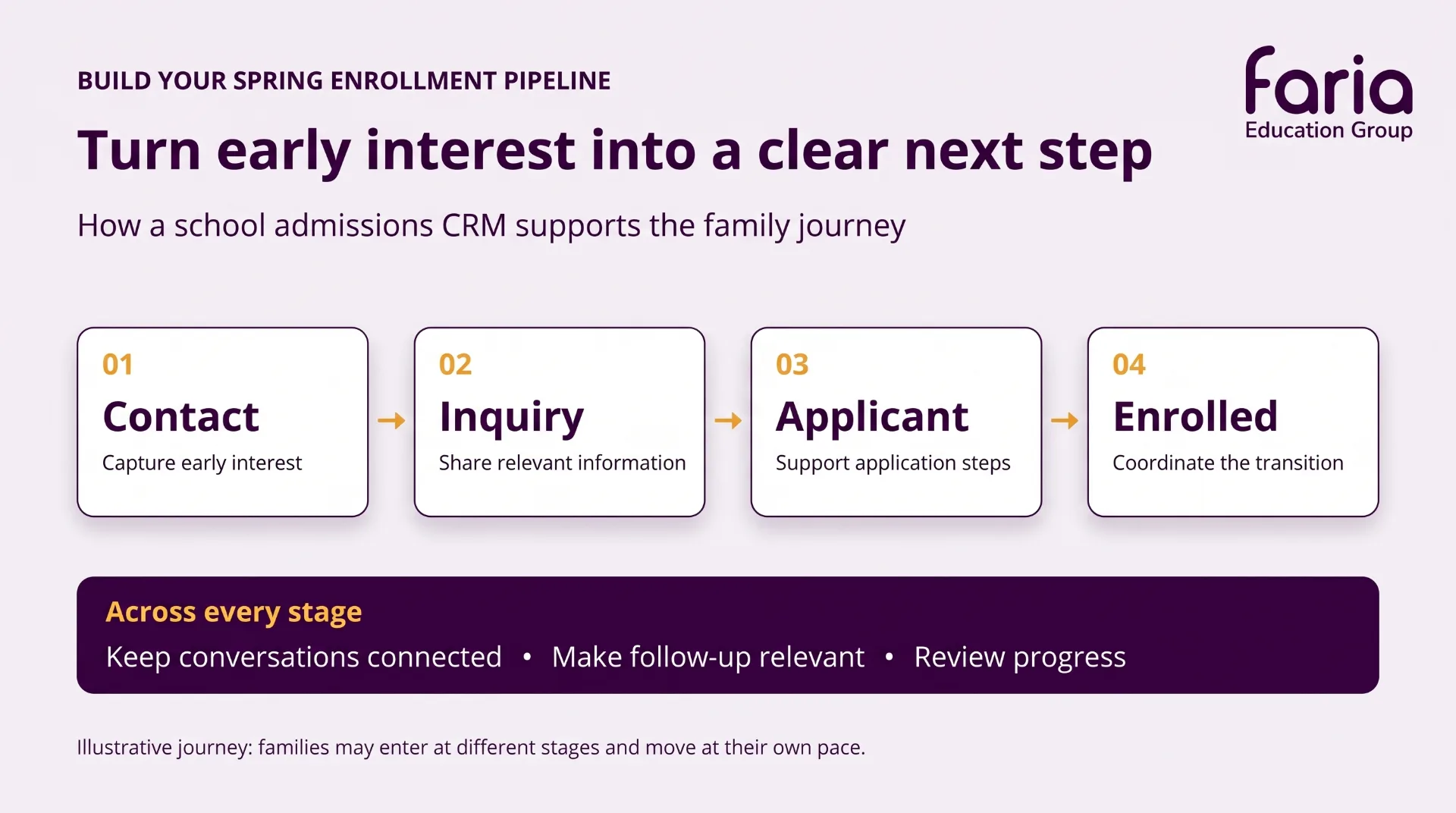
A school admissions CRM is a customer relationship management tool designed to organize prospective family contacts, communications, and admissions activity. It helps your team connect early marketing engagement with later inquiries and applications, maintaining a shared record as families move through the process. That continuity gives staff context for conversations and helps them see where follow-up is needed.
Families may enter at different stages and move at their own pace. A connected process helps your team provide relevant support throughout their journey.
Here are six practical ways to use those capabilities to prepare for spring enrollment.
1. Capture interest before asking for an application
An application is a significant commitment for a family still researching schools. If “Apply now” is your only invitation to connect, you may miss parents who want to learn more first.
Give families several ways to begin a relationship:
-
Sign up for school or program updates.
-
Request more information.
-
Register for an open house.
-
Schedule a campus visit.
For an initial sign-up, keep the form short. Collect enough information to continue the conversation, then learn more as the family engages. You can request the details needed for an application when they are ready for that step.
Use your CRM’s contact roster to keep these early prospects visible alongside families already in the admissions process. Add contacts from phone inquiries and events, too, so your pipeline reflects interest coming through different channels.
Start here: Review your website through the eyes of a parent who is interested but not ready to apply. Can they easily stay connected?
2. Organize contacts around what families need next
A growing contact list becomes more useful when your team can identify who needs which information.
An elementary school prospect, a family considering a middle school transfer, and a parent planning several years ahead have different questions. Their follow-up should reflect those differences.
Use your CRM’s mailing lists and filters to group families by information such as:
-
Program or grade-level interest.
-
Intended entry year, where known.
-
Current admissions status.
Keep early prospects distinct from active applicants. A parent exploring your school may need an multiple, regular touch points to engage with your school, like introduction to a program or an invitation to visit. A family completing an application may need help with a checklist item.
Configure mailing-list criteria so communications can change as a family progresses. When a contact becomes an applicant, review whether they should leave an introductory campaign and receive application support instead.
Start here: Create one targeted mailing list for a priority program or grade, using the information your team already has.
3. Build a short nurture sequence with a clear next step
Once a family expresses interest, plan what happens next. A welcome email starts the conversation; a thoughtful email sequence helps sustain it.
Use your CRM’s email campaign tools to share useful information over time. For example, a sequence for prospective elementary families could include:
-
A welcome and program introduction: Explain what families can expect and how to contact admissions.
-
A closer look at school life: Share a relevant story, classroom experience, or answer to a common question.
-
An invitation to visit: Offer a clear way to register for an event or schedule a tour.
Give each message a purpose and one clear next step. Review recipients and exclusions so families receive information appropriate to their current stage.
As families move into the application process, use automated confirmations and reminders to support routine steps. Personal conversations remain valuable when a parent has questions, needs reassurance, or is weighing a decision.
Start here: Build a three-message sequence for one audience, and assign someone to respond when families reply.
4. Keep the family conversation connected
A parent may sign up for updates, attend an open house, and later call admissions. Your team should be able to pick up that conversation with context.
Record calls, visits, interviews, and relevant outcomes in the CRM. Keep notes useful and specific: what the family asked, what information your team provided, and what follow-up is needed.
A shared interaction history helps staff avoid asking families to repeat themselves. It also gives admissions and marketing a clearer view of where interest is developing and where additional support may help.
Use internal notifications and task reminders to make handoffs easier. Agree on who handles new contacts, who follows up after events, and when a personal conversation is needed.
Start here: Choose a consistent way to record interactions and next steps at the contact level, then use that process across the team.
5. Connect marketing activity to enrollment progress
Website visits, email opens, and social engagement provide useful signals. To understand your pipeline, follow what happens after that initial activity.
Use source campaigns, unique links, and QR codes to help connect outreach with inquiries, applications, and enrollment. For example, create a tracked link for a program campaign or a QR code for an open house.
Then ask:
-
Which sources bring families who inquire?
-
Which inquiries move into an application?
-
Which campaigns generate interest that progresses toward enrollment?
A campaign with fewer visitors may still bring families who take meaningful next steps. Reviewing that progression helps admissions and marketing decide where to invest time and how to improve follow-up.
Start here: Track one upcoming campaign from its first response through the admissions stages, rather than reviewing traffic alone.
6. Review your pipeline by grade and stage
A school-wide inquiry total can hide differences between grades. Strong interest in one program may sit alongside a thin pipeline in another.
Use enrollment reports to review inquiries, applicants, newly enrolled students, and re-enrollment progress by grade. Compare that information with your school’s enrollment goals and available places.
Bring admissions and marketing together for a regular review:
-
Which grades need more prospective families?
-
Where are inquiries progressing?
-
Which families have stalled and may need support?
-
What outreach or follow-up should happen next?
Use lead scores, where available, as an additional signal of engagement. Combine them with interaction history and conversations to decide where personal follow-up could be most useful.
Start here: Set a short weekly pipeline review with one agreed action for each priority grade.
Choose one improvement now
Preparing for spring does not require changing every workflow at once. Start where your team is losing visibility or momentum: an event list waiting for follow-up, a website without a simple interest form, or inquiries scattered across inboxes.
Connect that entry point to your CRM, build relevant follow-up, and review what happens next. Expand the approach as your team establishes a process that works.
By March and April, you want more than a longer contact list. You want a clearer understanding of interested families, a record of their conversations with your school, and a practical next step for helping them move forward.
OpenApply CRM supports that work through early contact capture, targeted mailing lists, email campaigns, interaction tracking, and source reporting.
Explore how OpenApply CRM can support your spring enrollment pipeline
Request a Demo of OpenApply CRM
Extra Credit : Watch - Build your enrollment pipeline this fall
Want more ideas for putting your school admissions CRM to work? Join Kimberly Bormann and Michael Arnold for practical ways to capture early interest, personalize follow-up, and connect marketing activity with enrollment progress—so you can build relationships this fall that support spring enrollment.