


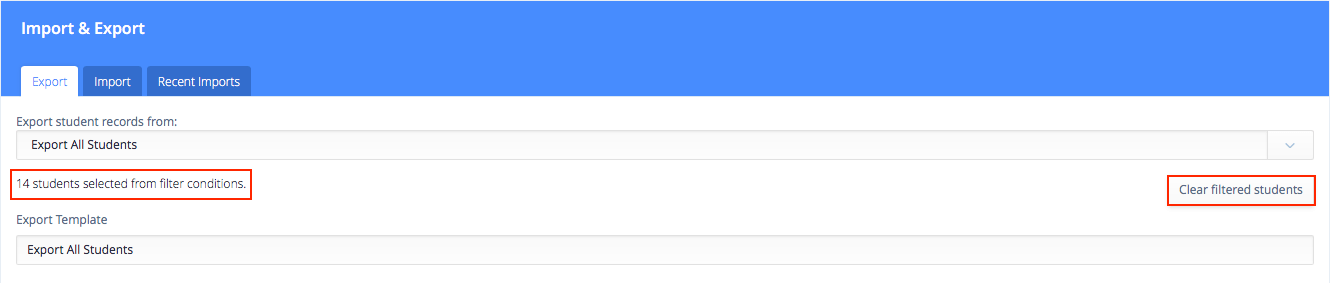
Clear Filters from Export Templates: If you have previously filtered for students, selected them for export, and then saved this as an export template, you can now view how many students were selected by the filter, and clear the filter, if necessary. This allows you to more easily see how many students will be included in the export, and to re-use and update export templates, which may have previously only included the filtered students.
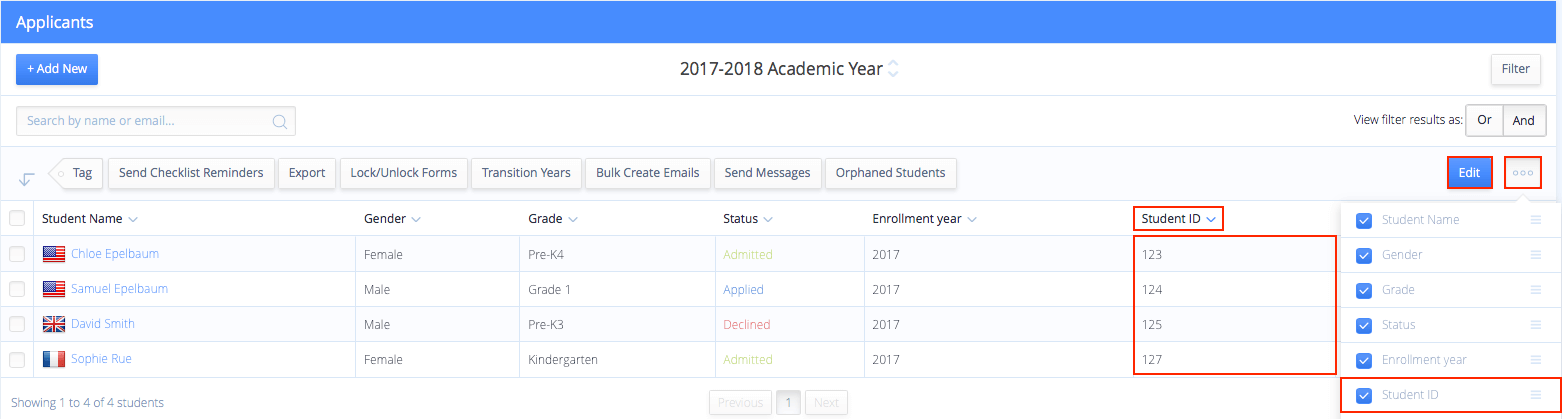 View, Sort and Edit Student ID on Rosters: You can now choose to display the Student ID on the Inquiries, Applicants, Students, and Alumni rosters. Click the 'three dots' icon, then check the box next to Student ID and click Save. Once the Student ID column is displayed, you can sort by clicking the arrow on the Student ID column, or edit in bulk by clicking the blue Edit button. This allows you to easily view, sort and edit Student ID in bulk.
Please visit our Help page for more information.
View, Sort and Edit Student ID on Rosters: You can now choose to display the Student ID on the Inquiries, Applicants, Students, and Alumni rosters. Click the 'three dots' icon, then check the box next to Student ID and click Save. Once the Student ID column is displayed, you can sort by clicking the arrow on the Student ID column, or edit in bulk by clicking the blue Edit button. This allows you to easily view, sort and edit Student ID in bulk.
Please visit our Help page for more information.